1.1 to 1.2 Upgrade Guide
Overview
New features:
-
Calculation Features General Availability: Speed up the execution of RealtimeFeatureViews using
Calculations. Calculations define features through simple sql-like expressions, removing the need for python transformation functions in realtime feature views. This delivers a performance boost in offline and online serving for most use cases. -
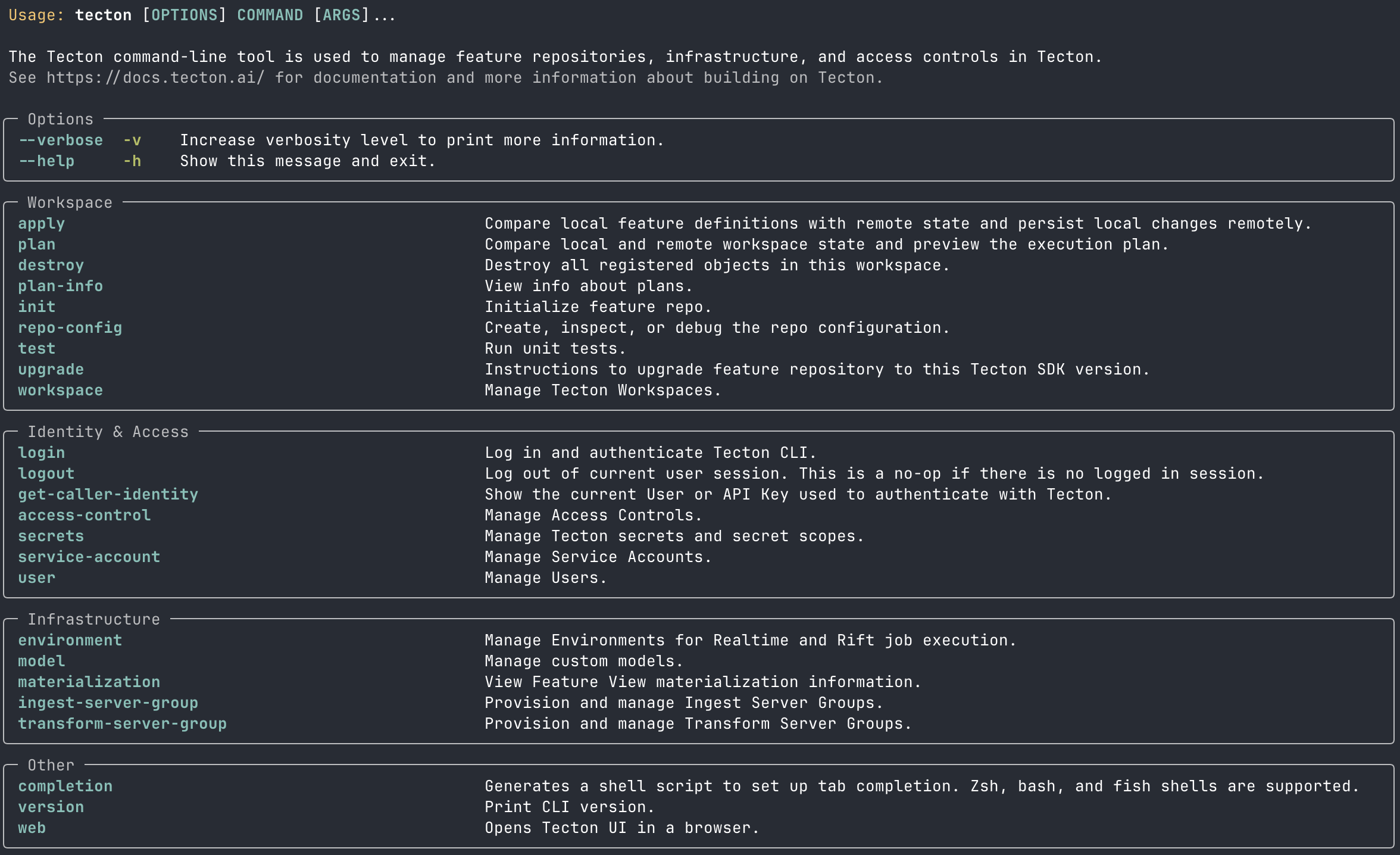
Enhanced Tecton CLI: New rendering styles for most CLI commands provide improved user experience.
-
Server Group Management CLI Commands: Use the new
ingest-server-groupandtransform-server-groupcommands to manage server groups for stream ingest and realtime serving.
The Server Group Management commands will not be operational until Stream Ingest V2 reaches General Availability in September.
-
Snowflake Key-Pair Authentication Support: You can now connect to Snowflake Data Source on Rift and Snowflake Data Sources on Spark using private key authentication. This enables seamless migration ahead of Snowflake's deprecation of password-based authentication.
-
Enhanced Realtime Feature View Testing: You can now mock source feature view columns in
RealtimeFeatureView.get_features_for_events()by appending the mock columns to theeventsDataFrame. This enables more comprehensive testing approaches beyondrun_transformation()for Realtime Feature Views.
Updated Behaviors:
-
tecton testImprovements:- Object validation is now skipped by default in tests for better performance
- Warnings are now shown by default to help identify potential issues
tecton testnow skips test files specified in.tectonignore
-
Default Python Version on EMR: EMR 6.X now defaults to Python 3.9 unless otherwise specified in the
EMRClusterConfig. -
Enhanced Timestamp Precision: Rift Offline Retrieval now returns timestamps with nanosecond precision for consistency with timestamp handling across Tecton.
-
Optimized Dataset Storage: Tecton Datasets are no longer partitioned by date, resulting in improved performance when reading datasets created by dataset generation jobs.
Breaking Changes:
set_connectionInterface Change: Theset_connectionmethod now accepts a dictionary of connection parameters instead of aSnowflakeConnectionobject. This function is only used in local development or local unit testing.
Deprecations and Removals:
-
Updated Runtime Versions:
- Databricks Runtime 10.4 is no longer supported (approaching end-of-life)
- EMR 6.9.0 is no longer supported
- Default versions updated to Databricks Runtime 13.3 and EMR 6.12.0 for improved stability and security
-
Server Group FCOs:
FeatureServerGroupandTransformServerGroupobjects are deprecated and can no longer be applied to a workspace. This is being replaced by api managed server groups (coming soon). -
Deprecated Snowflake Compute Mode Removed: Removed functions related to legacy snowflake compute mode. This functionality was deprecated in tecton 1.0 and is no longer enabled for any customers. This does not affect any users connecting to Snowflake using the Spark or Rift compute modes.
-
DataprocJsonClusterConfig: This configuration option has been removed for GCP environments.
Upgrade to 1.2
-
Ensure the steps in the 1.0 to 1.1 Upgrade Guide are complete.
-
Install Tecton 1.2 locally with
pip install tecton>=1.2.0 -
Update Materialization Runtime & Environment Defaults:
-
Spark-based Feature Views: Update the
tecton_materialization_runtimefield in yourrepo.yamlfile to1.2.0. Note that this will restart currently-running jobs forStreamFeatureViews. With Tecton's zero-downtime stream restarts, this will cause minimal disruption. -
Rift-based Feature Views: Update the
environmentfield in yourrepo.yamltotecton-core-1.2.0.Here's an example
repo.yaml:
defaults:
  batch_feature_view:
    tecton_materialization_runtime: 1.2.0 # For Spark-based Feature Views
    environment: tecton-core-1.2.0 # For Rift-based Feature Views
  stream_feature_view:
    tecton_materialization_runtime: 1.2.0 # For Spark-based Feature Views
    environment: tecton-core-1.2.0 # For Rift-based Feature Views
  feature_table:
    tecton_materialization_runtime: 1.2.0 # For Spark-based Feature Views
environment: tecton-core-1.2.0 # For Rift-based Feature Views -
-
Update Snowflake Connections (if applicable):
If you use Snowflake datasources in Rift and call
set_connection, update your code to pass a dictionary of connection parameters instead of aSnowflakeConnectionobject:Before:
snowflake_context.set_connection(snowflake_connection)After:
snowflake_context.set_connection(
    {
        "account": "your_account",
        "user": "your_user",
        "private_key": "your_private_key",
        # ... other connection parameters
    }
) -
Update EMR Python Version (if applicable):
If you're using EMR and want to maintain a specific Python version, explicitly set it in your
EMRClusterConfig:EMRClusterConfig(
emr_version="emr-6.12.0",
python_version="default" # Use EMR runtime default
# or specify a specific version like "python_3_9_13"
) -
Update Test Configuration (if applicable):
- Remove
conf.set("TECTON_SKIP_OBJECT_VALIDATION", "True")from your tests as validation is now skipped by default - Add
--suppress-warningsor setTECTON_SUPPRESS_TEST_WARNINGSif you want to suppress warnings in tests - Create a
.tectonignorefile to exclude test files from certain paths if needed
- Remove
-
Handle Timestamp Precision Changes (if applicable):
If your code depends on microsecond precision timestamps from Rift Offline Retrieval, update it to handle nanosecond precision or adjust your comparisons accordingly.
-
Apply the upgrade using
tecton apply, ortecton apply --integration-testto run integration tests.
Stream Ingest V2 Setup
When creating a new --live workspace, the CLI will now prompt to create server
groups for Stream Ingest V2. You can skip this with --skip-server-groups if
needed.