What is Tecton?
Tecton is the feature store for real-time machine learning at scale. It transforms raw data into machine learning–ready features and serves them to models with 100ms freshness and ultra-low latency. By automating feature pipelines, Tecton helps teams build accurate, reliable models faster, without the complexity of maintaining custom data infrastructure.
Think of Tecton as the feature layer of your ML stack:
- Transform raw data into features and embeddings your models can learn from.
- Serve those features quickly and reliably for real-time predictions.
- Guarantee consistency between training and serving, so models perform as expected in the real world.
The users who develop features using Tecton are generally either data scientists or machine learning engineers (MLEs), and they don't work in isolation.
Data scientists care about adding and refining the data that their models use to make inferences--and they are constantly adjusting the data used by their models in order to improve these inferences. However, they aren't experts in production infrastructure or the data pipelines that process data and serve it at production scale--for that, they generally rely on Machine Learning Engineers.
MLEs support more than just features--they are typically responsible for the entire MLops infrastructure including the data pipelines set up to deliver features at scale--and MLE teams often support multiple teams of data scientists working on a diverse set of projects.
Feature Productionalization for ML Models
A feature is a measurable property or characteristic of a phenomenon being observed. Features are the inputs that models use to learn patterns from data and to make inferences. They are created by transforming raw data into the specific information that a model will be provided. A feature can be as simple as simply representing an attribute such as a user’s location, or can be an aggregation or calculation such as an average daily account balance or the sum of the last 100 transactions on a credit card.
Here's an example of a feature that counts the number of transactions over the last 30 days.
Aggregate(
    input_column=Field("transaction", Int64),
    function="count",
    time_window=TimeWindow(window_size=timedelta(days=30)),
),
A feature store is infrastructure which configures, deploys and manages data pipelines that transform data into features and serve those features to ML models. Those data pipelines are typically declared in source code or a domain-specific language, and that code is applied by the feature store to set up pipelines, configure feature definitions, orchestrate materialization jobs and define the serving endpoints that model applications will use to retrieve features.
Tecton is a feature store. In Tecton, a feature view defines a set of features that will be computed and stored. In the code sample below, you can see an example feature view, which defines three aggregated features that count the number of transactions over different time periods.
Here's an example of a feature view user_transaction_counts and three
individual aggregation features that count the number of transactions over the
last day, 30 days, and 90 days.
@batch_feature_view(
    sources=[transactions_batch],
    entities=[user],
    mode="pandas",
    aggregation_interval=timedelta(days=1),
    timestamp_field="timestamp",
    features=[
        Aggregate(
            input_column=Field("transaction", Int64),
            function="count",
            time_window=TimeWindow(window_size=timedelta(days=1)),
        ),
        Aggregate(
            input_column=Field("transaction", Int64),
            function="count",
            time_window=TimeWindow(window_size=timedelta(days=30)),
        ),
        Aggregate(
            input_column=Field("transaction", Int64),
            function="count",
            time_window=TimeWindow(window_size=timedelta(days=90)),
        ),
    ],
    online=True,
    offline=True,
    feature_start_time=datetime(2022, 5, 1),
    description="User transaction totals over a series of time windows, updated daily.",
)
def user_transaction_counts(transactions):
    transactions["transaction"] = 1
    return transactions[["user_id", "transaction", "timestamp"]]
Models don't directly access features from feature views. Instead, a feature service collects feature views together and provides an API endpoint that models can use to access individual features. Feature services provide an API for retrieving features, and provide a convenient abstraction, so that models don’t need to know which feature views implement the features they require--the model just uses the API provided by the appropriate feature service.
Here's an example of a feature service, which collects several individual features together from two different feature views into a single serving endpoint.
from tecton import FeatureService
from feature_repo.shared.features.ad_ground_truth_ctr_performance_7_days import (
    ad_ground_truth_ctr_performance_7_days,
)
from feature_repo.shared.features.user_total_ad_frequency_counts import (
    user_total_ad_frequency_counts,
)
from feature_repo.shared.features.user_ad_impression_counts import (
    user_ad_impression_counts,
)

ctr_prediction_service = FeatureService(
    name="ctr_prediction_service",
    description="A Feature Service used for supporting a CTR prediction model.",
    online_serving_enabled=True,
    features=[
        # add all of the features in a Feature View
        user_total_ad_frequency_counts,
        # add a single feature from a Feature View using double-bracket notation
        user_ad_impression_counts[["count"]],
    ],
)
Models consume these features in two modes: offline, typically when a large dataset is created at a specific point in time in order to train that model; and online, in an ongoing process where a set of features about a specific entity is provided to a model for it to make an inference.
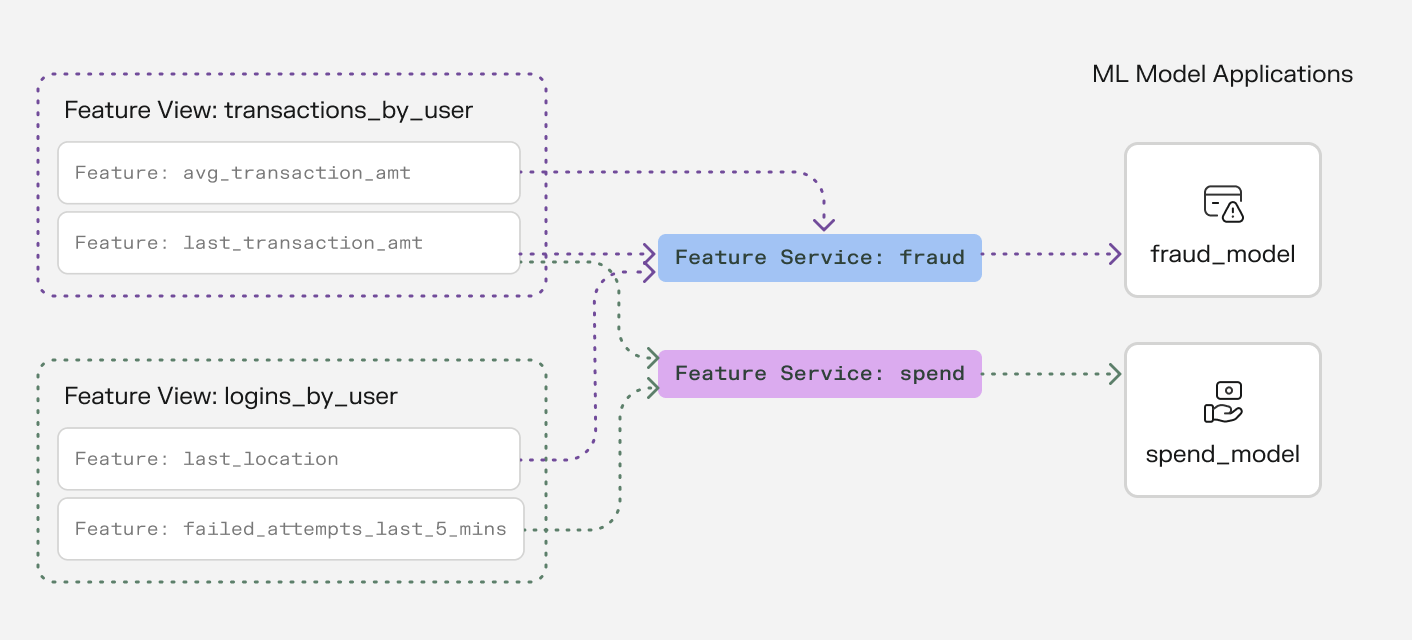
A typical arrangement of Feature Views and Feature Services, illustrating how Feature Services logically group individual features from multiple Feature Views into sets provided to individual ML models.
Problems Tecton Solves
When teams build AI applications, they often face common challenges:
- Data preparation takes too long and is error-prone
- Getting fresh data to models in production is complex and slow
- Training data doesn't match production data, leading to poor model performance
- Managing access controls, viewing lineage, and reusing features and embeddings becomes increasingly complex with growing teams
Why ML Teams Love Tecton
Tecton excels at the hard technical problems that ML teams face when deploying models to production:
- Feature Serving: Highly performant online feature serving at scale. Retrieve features, embeddings, and prompts in real-time at <5 ms at 100K requests per second.
- Time Window Aggregations: Calculate features over any time window (minutes to years) with millisecond latency, even at massive scale. Want to compute "average transaction amount over the last 7 days" for millions of users? Tecton handles this seamlessly.
- Real-time and Streaming Feature Computation: Write feature logic once and Tecton executes it consistently both in real-time for predictions and offline for training. No more duplicate logic between training and serving.
- Managed Infrastructure: Focus on building features, not infrastructure. Tecton handles all the complex data infrastructure needed for feature computation and serving - from stream processing to online stores to monitoring. Built-in optimizations like autoscaling and managed caching ensure cost-effective performance without the operational overhead.
- Historical Backfills: Need to generate historical feature values for a new feature? Tecton automatically handles point-in-time correct backfills, saving you from writing complex data processing logic.
- Training Data Generation: Automatically generate training datasets that perfectly match your production features, eliminating the common problem of training-serving skew.
Who Uses Tecton?
Companies like Atlassian, Block, and Plaid use Tecton to power their AI applications. Whether you're building a fraud or risk detection system, a recommendation engine, or a chatbot, Tecton helps you move from prototype to production faster and more reliably.
Ready to Get Started?
→ Take our 10-minute Quickstart tutorial
→ Take an Interactive Tour
→ Read about core concepts
→ Dive in and start developing features