Feature Services
A Feature Service is a Tecton object that groups together one or more Feature Views to create a reusable bundle of features. Feature Services are the unit of consumption for both real-time inference and offline training. By defining a Feature Service, you ensure that the same logic, transformations, and features are used consistently across your model lifecycle.
It is generally recommended that each model deployed in production have one associated Feature Service deployed, which serves features to the model.
A Feature Service provides:
- An HTTP API to access feature values at the time of prediction
- A one-line method call to rapidly construct training data for user-specified timestamps and labels
- The ability to observe the endpoint where the data is served to monitor serving throughput, latency, and prediction success rate
Feature Services Workflow
To use a Feature Service:
- Select one or more Feature Views to include.
- Create a
FeatureServiceobject and assign it a name. - Apply the Feature Service to a workspace using the Tecton CLI.
- Use the Feature Service to fetch training data or serve features in real-time.
- Optionally create variants of a Feature Service to support A/B testing, staging, or incremental model development.
Minimal Example
from tecton import FeatureService

fraud_detection = FeatureService(name="fraud_detection", features=[user_transaction_averages])
What's Next
Once you've created a Feature Service, here are some recommended next steps:
- Generate training data
using
get_features_for_events(). - Use
get_online_features()to retrieve features in real time for inference. - Define additional Feature Views.
- Share features across services and use cases to reduce cost and duplication.
How to Use Feature Services
Example: Defining a Feature Service
The following example defines a Feature Service.
from tecton import FeatureService
from feature_repo.shared.features.ad_ground_truth_ctr_performance_7_days import (
    ad_ground_truth_ctr_performance_7_days,
)
from feature_repo.shared.features.user_total_ad_frequency_counts import (
    user_total_ad_frequency_counts,
)
from feature_repo.shared.features.user_ad_impression_counts import (
    user_ad_impression_counts,
)

ctr_prediction_service = FeatureService(
    name="ctr_prediction_service",
    description="A Feature Service used for supporting a CTR prediction model.",
    online_serving_enabled=True,
    features=[
        # add all of the features in a Feature View
        user_total_ad_frequency_counts,
        # add a single feature from a Feature View using double-bracket notation
        user_ad_impression_counts[["count"]],
    ],
)
- The Feature Service uses the
user_total_ad_frequency_counts, anduser_ad_impression_countsFeature Views. - The list of features in the Feature Service are defined in the
featuresargument. When you pass a Feature View in this argument, the Feature Service will contain all the features in the Feature View. To select a subset of features in a Feature View, use double-bracket notation (e.g.FeatureView[['my_feature', 'other_feature']].)
| Parameter | Description |
|---|---|
name | Unique name for the Feature Service |
features | List of Feature Views or other Feature Services to include |
description | Optional description of the Feature Service |
owner | Optional owner metadata |
tags | Optional tags for categorization or search |
prevent_destroy | Optional flag to prevent accidental deletion of critical Feature Services |
on_demand_environment | Runtime environment for evaluating real-time transformations |
Create a Feature Service with Multiple Features
from tecton import FeatureService

fraud_detection_v2 = FeatureService(
    name="fraud_detection_v2",
    features=[transaction_amount_is_higher_than_average, user_transaction_amount_averages, user_credit_card_issuer],
)
Use the Feature Service for Training
import pandas as pd

training_events = pd.read_parquet("training_events.parquet")
training_data = fraud_detection_v2.get_features_for_events(events=training_events).to_pandas()
Use the Feature Service for Online Inference
features = fraud_detection_v2.get_online_features(join_keys={"user_id": "user_123"}, request_data={"amount": 750.00})

print(features.to_dict())
Update a Feature Service
Tecton objects are immutable. To change the features in a Feature Service,
create a new one (e.g., fraud_detection_v3) with the updated list of features.
Using the low-latency HTTP API Interface
See the Reading Online Features Using the HTTP API guide.
Using the Offline Feature Retrieval SDK Interface
Use the offline or batch interface for batch prediction jobs or to generate
training datasets. To fetch a dataframe from a Feature Service with the Python
SDK as a client, use the FeatureService.get_features_for_events() method.
To make a batch request, first create a context consisting of the join keys for prediction and the desired feature timestamps:
events = spark.read.parquet("dbfs:/sample_events.pq")
display(events)
Sample output (data not shown):
| ad_id | user_uuid | timestamp | clicked |
|---|---|---|---|
| ... | ... | ... | ... |
| ... | ... | ... | ... |
Then, using get_features_for_events(), generate the feature values:
import tecton

ws = tecton.get_workspace("prod")
feature_service = ws.get_feature_service("price_prediction_feature_service")
result_spark_df = feature_service.get_features_for_events(events).to_pandas()
Sample output (data not shown):
| ad_id | user_uuid | timestamp | clicked | ad_ground_truth_ctr_performance_7_days__ad_total_clicks_7days | ad_ground_truth_ctr_performance_7_days__ad_total_impressions_7days |
|---|---|---|---|---|---|
| ... | ... | ... | ... | ... | ... |
| ... | ... | ... | ... | ... | ... |
Feature Naming
Feature names in Tecton are determined based on the feature type. Some feature
types require a name in the feature definition. For others (Aggregation for
example), Tecton will apply a default name based on the feature definition, etc.
unless a name is specified via the name parameter:
@batch_feature_view(
    # ...
    features=[
        Aggregate(
            input_column=Field("another_column", Int64),
            function="mean",
            time_window=TimeWindow(window_size=timedelta(days=1)),
            name="1d_average",
            description="my aggregate feature description",
            tags={"tag": "value"},
        ),
    ],
)
def my_feature_view(my_agg):
    return my_agg[...]
Using Feature Logging
Feature Services have the ability to continuously log online requests and feature vector responses as Tecton Datasets. These logged feature datasets can be used for auditing, analysis and training dataset generation.
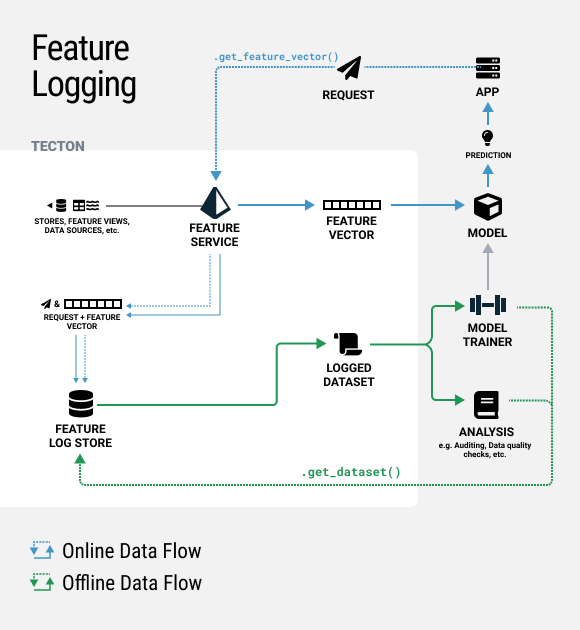
To enable feature logging on a FeatureService, simply add a
LoggingConfig like in
the example below and optionally specify a sample rate. You can also optionally
set log_effective_times=True to log the feature timestamps from the Feature
Store. As a reminder, Tecton will always serve the latest stored feature values
as of the time of the request.
Run tecton apply to apply your changes.
from tecton import LoggingConfig

ctr_prediction_service = FeatureService(
    name="ctr_prediction_service",
    features=[ad_ground_truth_ctr_performance_7_days, user_total_ad_frequency_counts],
    logging=LoggingConfig(
        sample_rate=0.5,
        log_effective_times=False,
    ),
)
This will create a new Tecton Dataset under the Datasets tab in the Web UI. This dataset will continue having new feature logs appended to it every 30 mins. If the features in the Feature Service change, a new dataset version will be created.
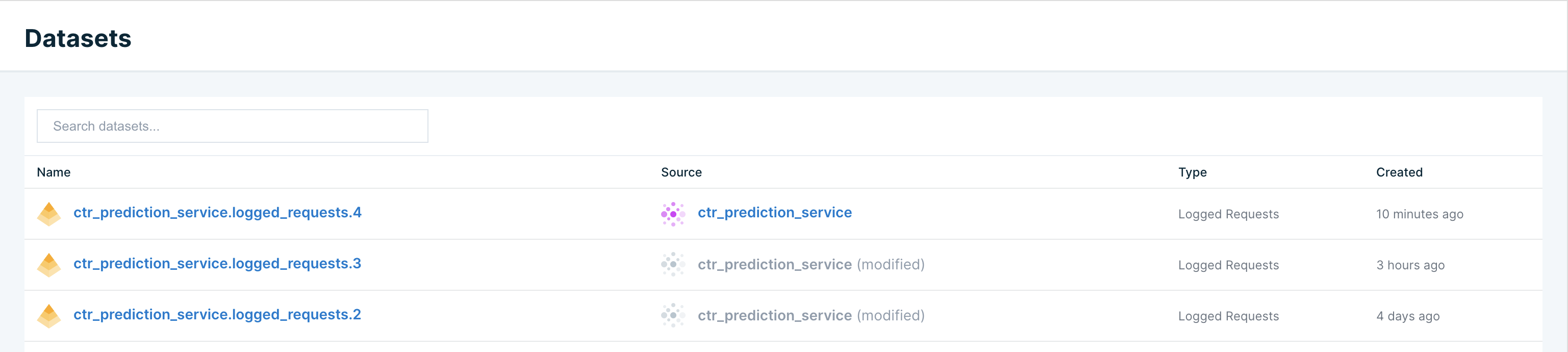
This dataset can be fetched in a notebook using the code snippet below.
AWS EMR users will need to follow instructions for installing Avro libraries notebooks to use Tecton Datasets since features are logged using Avro format.
import tecton

ws = tecton.get_workspace("prod")
dataset = ws.get_dataset("ctr_prediction_service.logged_requests.4")
display(dataset.to_pandas())
Sample output (data not shown):
| ad_id | user_uuid | timestamp | clicked | ad_ground_truth_ctr_performance_7_days__ad_total_clicks_7days | ad_ground_truth_ctr_performance_7_days__ad_total_impressions_7days |
|---|---|---|---|---|---|
| ... | ... | ... | ... | ... | ... |
| ... | ... | ... | ... | ... | ... |