Detect Feature Drift with Fiddler
Tecton integrates with Fiddler for AI observability, this page describes the integration points and provides code examples for each.
Fiddler is an AI Observability and Security platform for monitoring, analyzing and improving ML model performance in production. Based on the ML use case, it tracks drift – in both model output, and the features supplied as inputs.
Tecton integrates with Fiddler to provide Feature Drift and Model Performance analysis.
Process Overview
Training data in the form of a dataset obtained from a Tecton Feature Service is
used to build a model and then uploaded to Fiddler to create the pre-production
baseline that establishes expected feature and prediction distributions. When a
model makes predictions using features from Tecton, the event identifier,
resulting prediction, and input features are submitted to Fiddler as an event or
batch upload. At a later time, when the events are labeled, the ground truth
associated with each event is uploaded to Fiddler. This enables Fiddler's
feature and model drift tracking by comparing online value distributions to the
training baseline.
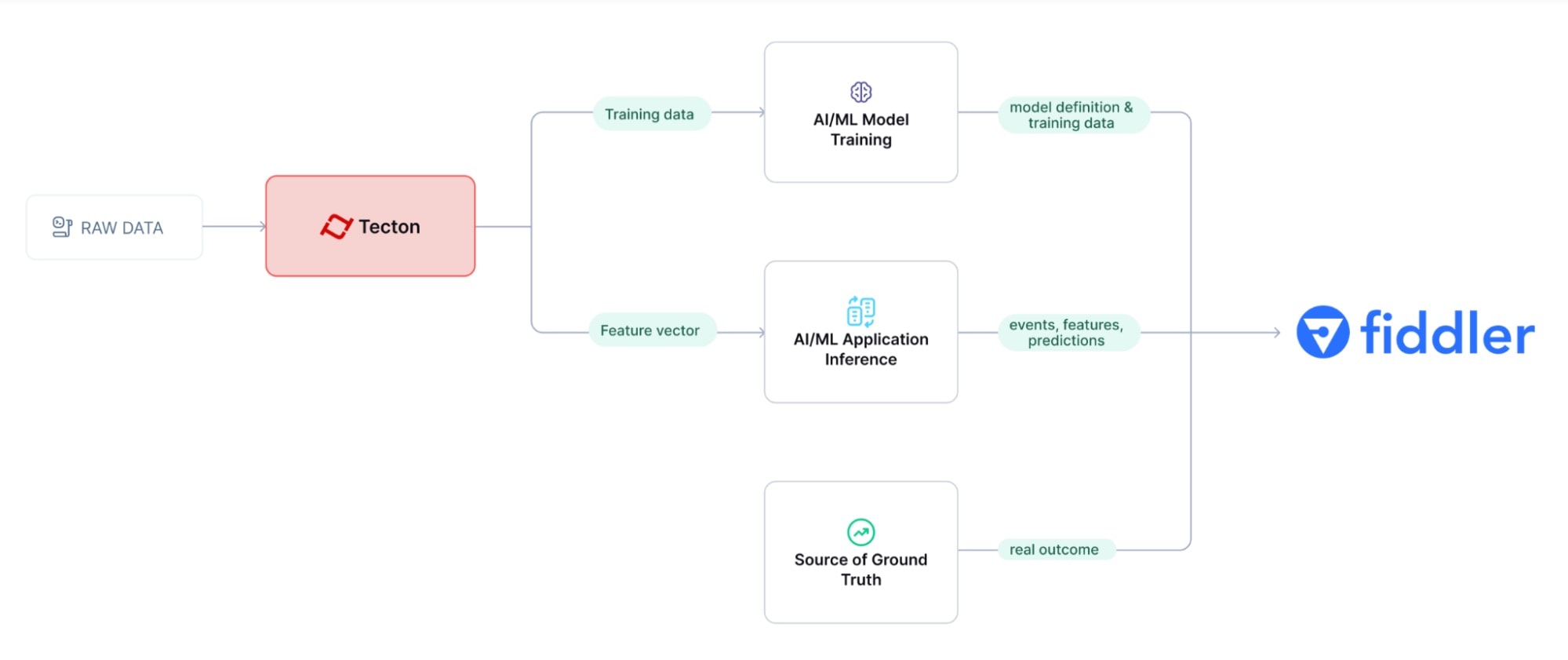
The example use case below uses Fiddler logging of training data and online feature data from Tecton as well as inference time results to deliver model and feature drift analysis.
The process is divided into the following steps:
- Perform Pre-production Training
- Register the Model in Fiddler
- Prepare and Publish Baseline Data
- Logging Inference to Fiddler in a Production Application
- Logging Ground Truth
- See Proactive ML Monitoring in Action
1. Pre-Production Training
In a notebook, use the Feature Service method get_features_for_events to
retrieve time-consistent training data. Depending on the volume of the data, you
can run training
data generation
using local compute or larger remote engines like Spark or EMR.
Given a dataframe of training events (labeled or not), get_features_for_events
enhances each event with time-consistent feature values. Training data needs to
be time consistent to prevent initial feature drift in production. This means
retrieving feature values exactly as they would have been calculated at the time
of each training event.
training_data = fraud_detection_feature_service.get_features_for_events(training_events).to_pandas().fillna(0)
Here's a sample of the resulting training_data:
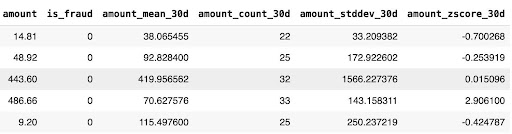
This training data is then used to train and validate an ML model in an ML development platform, and this is the first point at which Fiddler can be integrated into the process.
2. Register the Model in Fiddler
Next, register the model with Fiddler, and create baselines for the model training data and outputs.
Fiddler logging code integrates directly into your model training code and runs wherever and whenever you run your final model training. This might be in a notebook or a scheduled training script that is used when a model is ready to be deployed to production.
Initialize Fiddler:
import fiddler as fdl

URL = "https://<your-fiddler-org>.cloud.fiddler.ai/"
TOKEN = "<Your Fiddler access token>"

fdl.init(url=URL, token=TOKEN)
Create or retrieve the Fiddler project where the new model will be created:
project = fdl.Project.get_or_create(name="tecton_integration")
Identify which columns in your dataset are input features, prediction output, target and other metadata columns :
# define the model schema
model_spec = fdl.ModelSpec(
    inputs=input_columns,  # input features
    outputs=["predicted_fraud"],  # model prediction
    targets=["fraud_outcome"],  # truth label
    metadata=["user_id", "timestamp"],
)
Create the model in Fiddler:
fdl_model = fdl.Model.from_data(
    name="transaction_fraud_monitoring",
    version="v1.6",
    project_id=project.id,
    source=eval_data_df.sample(100),  # sample infer data types
    spec=model_spec,
    task=fdl.ModelTask.BINARY_CLASSIFICATION,  # type of model
    task_params=fdl.ModelTaskParams(target_class_order=["Not Fraud", "Fraud"]),
    event_id_col="transaction_id",  # unique id for each event
    event_ts_col="timestamp",  # event time column
)

# register new model on Fiddler
fdl_model.create()
Note that event_id_col should point to a column that is a unique identifier of
each prediction. This is used for production events that record the prediction
and corresponding ground truth at different times.
3. Prepare and Publish Baseline Data
Next, we let Fiddler know what the baseline data looks like for this model, so it has a reference to compare new feature values for drift analysis.
To prepare the baseline, the trained model is used to calculate predictions for
the baseline training data, the true outcome of the event (fraud_outcome) is
added along with the model prediction (predicted_fraud):
# extract input columns for prediction
input_data = training_data.drop(["transaction_id", "user_id", "timestamp", "amount"], axis=1)
input_data = input_data.drop("is_fraud", axis=1)

# calculate predictions
predictions = model.predict(input_data)

# add prediction to training set
training_data["predicted_fraud"] = predictions.astype(float)

# add outcome column
training_data.loc[(eval_data_df["is_fraud"] == 0), "fraud_outcome"] = "Not Fraud"
training_data.loc[(eval_data_df["is_fraud"] == 1), "fraud_outcome"] = "Fraud"
Here's an excerpt of the baseline training data:
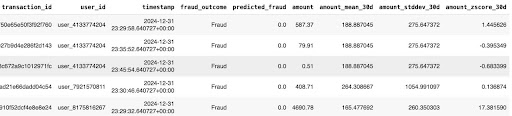
And here's how to log that training data to the Fiddler model:
baseline_publish_job = fdl_model.publish(
    source=training_data,
    environment=fdl.EnvType.PRE_PRODUCTION,
    dataset_name=STATIC_BASELINE_NAME,
)
# wait for publishing to complete
baseline_publish_job.wait()
4. Logging Inference to Fiddler in a Production Application
ML Applications are deployed in different ways, but they will all follow the same 2-step process:
- Retrieve feature vector from Tecton for a new request
- Get a prediction from the model using the feature vector
The following sequence of code simulates the process of an ML application to
illustrate. The hard-coded current_transaction holds some inputs needed to
retrieve features from Tecton, and also includes identifying columns like the
transaction_id, user_id, and timestamp which are needed for logging the
event on Fiddler:
current_transaction = {
    "transaction_id": "57c9e62fb54b692e78377ab54e9d7387",
    "user_id": "user_1939957235",
    "timestamp": "2025-04-08 10:57:34+00:00",
    "amount": 500.00,
}
Retrieve online features from Tecton:
# feature retrieval for the transaction
feature_data = fraud_detection_feature_service.get_online_features(
    join_keys={"user_id": current_transaction["user_id"]}, request_data={"amount": current_transaction["amount"]}
)

# feature vector prep for inference
data = [feature_data["result"]["features"]]
features = pd.DataFrame(data, columns=columns)[X.columns]

# inference
prediction = {"predicted_fraud": model.predict(features).astype(float)[0]}
When a model makes predictions using features from Tecton, the prediction result along with the input features and event identifiers are logged to Fiddler as an event. This enables Fiddler feature and model drift tracking by comparing values to the training baseline.
Add this code to each prediction:
# build full event that includes IDs, features and prediction
publish_data = current_transaction | features.to_dict("records")[0] | prediction

fdl_model = fdl.Model.from_name(name="transaction_fraud_monitoring", project_id=project.id)

fdl_model.publish(publish_data, environment=fdl.EnvType.PRODUCTION)
5. Logging Ground Truth
Since this is a fraud detection example, the ground truth is whether the
transaction is fraudulent or not. In most cases this information is unknown
until some arbitrary time later, like when the cardholder reports a transaction
as fraudulent. This is the reason that Fiddler models include the event_id_col
which indicates which data column uniquely identifies an event. Use Fiddler's
asynchronous logging of the target column by using the event_id_col to
associate a logged prediction with its corresponding ground truth.
Example:
event_update = [
    {
        "fraud_outcome": "Fraud",
        "transaction_id": "57c9e62fb54b692e78377ab54e9d7387",
    },
]

# Streaming update returns the list of event ID(s) updated.
event_id = fdl_model.publish(
    source=event_update,
    environment=fdl.EnvType.PRODUCTION,
    update=True,
)
6. See Proactive ML Monitoring in Action
Now it's possible to leverage Fiddler to provide feedback on model performance, and get early alerts on the feature data pipeline. This feedback can then be used to adjust feature engineering in Tecton and/or retrain the model.
The Fiddler dashboard shows features that are drifting over the last two weeks and how it affects the prediction distribution:
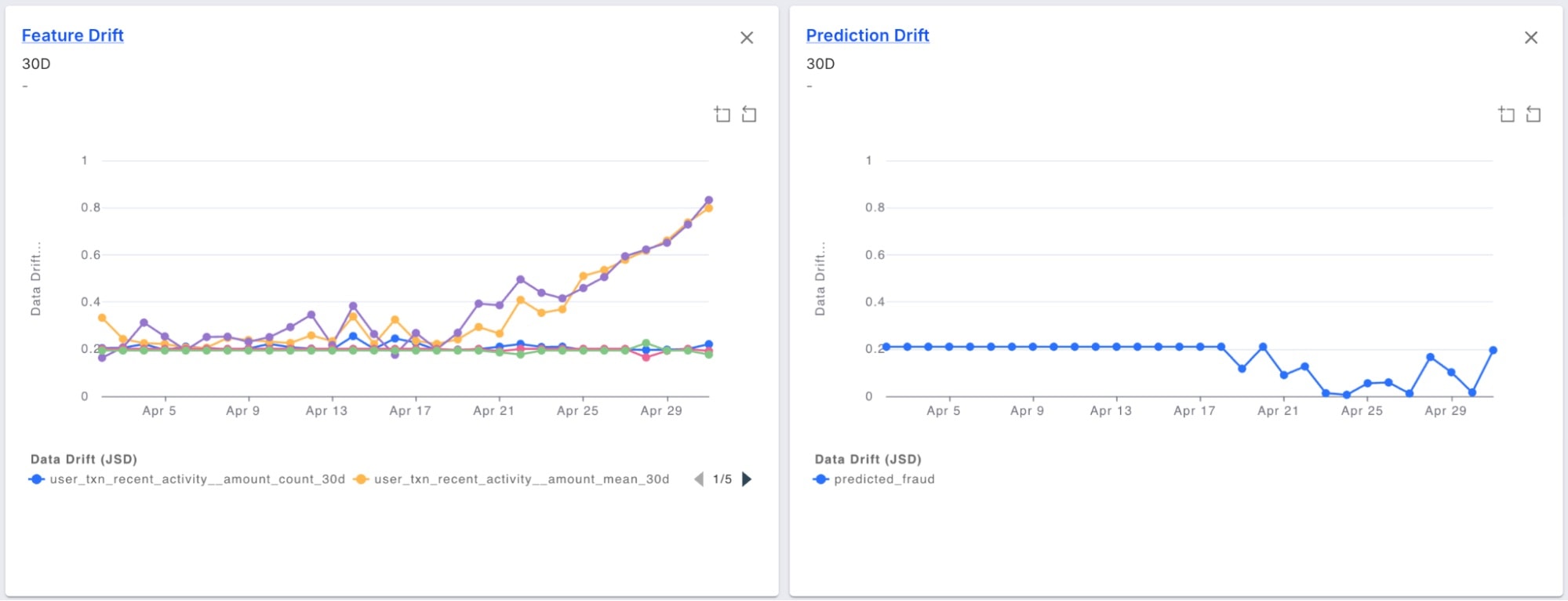
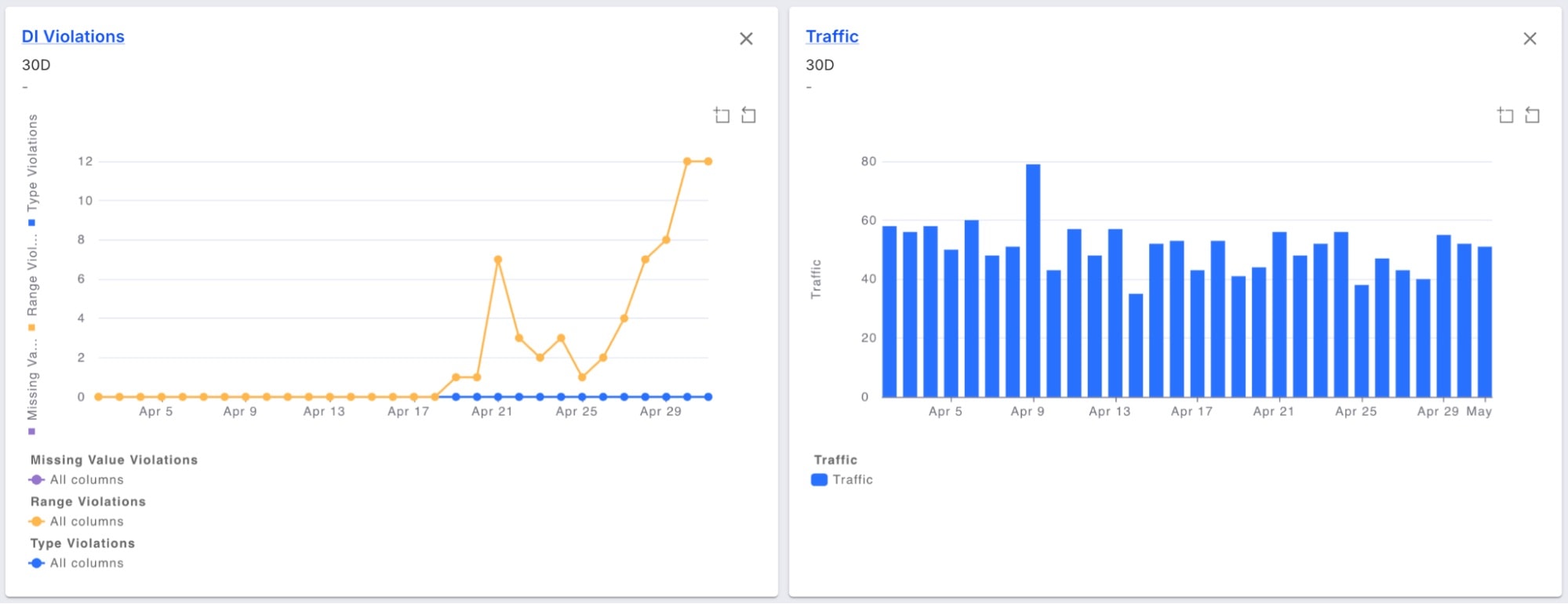
The results:
- A great monitor of the model performance, ensuring fraud detection accuracy are maintained over time
- An early warning system for issues in the upstream data or skew in the features
Additionally, set up Fiddler alerts, to get notified whenever any of the features or model distributions drift beyond a threshold, then address model issues before they impact the business.
Learn more: