Integration Tests
An Integration Test simulates the materialization process for a Feature View so
that developers can quickly test that their feature definitions will run
successfully in production. Integration tests can be kicked off as part of
tecton plan or tecton apply. The test jobs are configured with the same
attributes and cluster configurations as the Feature View's actual
materialization jobs. They will attempt to materialize data starting from the
feature's start time, without actually writing data to the offline or online
store.
When to Use Integration Tests?
Use integration tests when you have new feature views or have made changes to existing feature views. Some of the most common things integration tests can test before you apply to production include:
- Validates output schema. Confirms the schema produced by executing the transformation matches the expected schema declared in the feature view definition.
- Verifies data source access. Tests connectivity, authentication, and permissions to upstream data sources required by the Feature View.
- Ensures execution environment compatibility. Validates that the runtime version (Spark/Rift) and all required dependencies can successfully execute the transformation code without conflicts or missing dependencies.
What integration tests do not test for:
- Availability of data. If no data is available in your data source, the integration test can still succeed.
How To Use Integration Tests
Requirements
- Only runs within live workspaces
- Either online or offline materialization must be enabled
- Editor, Operator, or Admin role is needed to kick off integration tests
Constraints
- Currently not supported for Stream Ingest API features
Kicking Off Integration Test Jobs
Integration tests can be kicked off as part of tecton plan or tecton apply:
tecton plan --integration-test: Runs the tests and shows the changes that would be made to the repo if the changes were applied.tecton apply --integration-test: Runs the tests and prompts the user to confirm whether it's ok to apply to the repo if these jobs succeed.- You can optionally use the
--yesflag to automatically opt-in to applying to the workspace upon the success of integration tests.
- You can optionally use the
The following tests will be kicked off for each FV type:
| Feature View Type | Integration Tests |
|---|---|
| Spark Batch FV | Batch integration tests |
| Spark Streaming FV | Batch integration tests (if offline=True) and stream integration tests (if online=True) |
| Rift Batch FV | Batch integration tests |
| Stream Ingest API FVs | Currently not supported. No batch or stream integration test jobs are kicked off. |
| Real Time FVs | No integration tests are kicked off as there is no materialization |
What the Integration Test Job Does
Batch FVs (both Spark and Rift):
- Processes exactly one batch interval of data, starting
from
feature_start_time - Validates data source connection, transformation logic, and schema compatibility
- Marked as successful if configuration is valid, regardless of whether data was found in the selected time range
Stream FVs (Spark only):
- Spins up a streaming cluster then connects to your stream source
- Reads from the earliest available data in the stream
- Marked as successful as soon as it processes any data through the pipeline
- If no data appears, automatically times out after 10 minutes and still marks the test as successful
Which Changes Trigger an Integration Test
When the command tecton plan/apply --integration-test is executed, integration
tests will be triggered for FVs that underwent the following modifications:
- All
CREATEchanges: When a Feature View is created with online or offline materialization enabled. - All
RECREATEchanges: When a Feature View (with online or offline materialization enabled) is destructively updated.- e.g. Switching the offline store from Parquet to Delta
- e.g. Updating a Feature View transformation or adding a new Aggregation
- This applies even when a
RECREATEchange is made with-suppress-recreates
- Some
UPDATEchanges: When a Feature View (with online or offline materialization enabled) is non-destructively updated. This includes changes such as:- Modifying
batch_computeorstream_computeincluding changes such as- Upgrading the EMR or Databricks Runtime Version
- Updating the AMI of a materialization cluster
- Adding new dependencies to a materialization cluster
- Modifying
tecton_materialization_runtimefor Spark-based Feature Views - Modifying
environmentsfor Rift-based Batch Feature Views
- Modifying
Manual Feature View Selection
To run integration tests on a specific subset of Feature Views, or to test a Feature View that is not modified in the current diff, the desired Feature Views can be explicitly specified in the command.
Tecton supports the following CLI options to specify which Feature Views to spin up Integration Tests for:
tecton plan --integration-test-select=":none:"# Default. No integration tests.
tecton plan --integration-test-select=":auto:"# Auto behavior described above
tecton plan --integration-test-select="fv1,fv2,fv3"# Comma-separated list of FVs
tecton plan --integration-test-select="pre1*,pre2*"# All FVs prefixed with "pre1" or "pre2".
tecton plan --integration-test-select="pre*suf"# All FVs prefixed with "pre" and suffixed with "suf".
Monitoring the Test
Below is a sample CLI output for a new Batch Feature View that triggered an
integration test as part of tecton plan:
  + Create Batch Feature View
    name:           user_transaction_metrics
    description:    User transaction metrics over 1, 3 and 7 days
    materialization: 11 backfills, 1 recurring batch job, 1 integration test
    > backfill:     10 Backfill jobs from 2022-12-25 00:00:00 UTC to 2024-08-02 00:00:00 UTC writing to the Offline Store
                    1 Backfill job from 2024-08-02 00:00:00 UTC to 2024-08-09 00:00:00 UTC writing to both the Online and Offline Store
    > incremental:  1 Recurring Batch job scheduled every 1 day writing to both the Online and Offline Store
    > integration test: 1 Integration test triggered for Batch job

↑↑↑↑↑↑↑↑↑↑↑↑ Plan End ↑↑↑↑↑↑↑↑↑↑↑↑
 Generated plan ID is ad7bbf597fe94359bf18dcf05b9742fc
You can track the test job status via tecton plan-info show {plan_id}:
Plan Started At: 2024-08-09 00:20:12 UTC
Plan Created By: example@tecton.ai
Plan Applied: False
Integration Test Status: Running
Status by Feature View:
    user_transaction_metrics: Running
View your plan in the Web UI: https://example.tecton.ai/app/job-link
You can also view all the plans and their statuses via tecton plan-info list:
Using workspace "demo" on cluster https://example.tecton.ai
            Plan Id                Plan Status   Test Status         Created by               Creation Date        SDK Version
==============================================================================================================================
695990c396214796bf24f436bf0d7208     Created       Running     example@tecton.ai   2024-08-26 22:37:22 UTC
19d0b1bc436443edbdeff717a0359bd4     Created       Failed      example@tecton.ai   2024-08-26 21:47:45 UTC
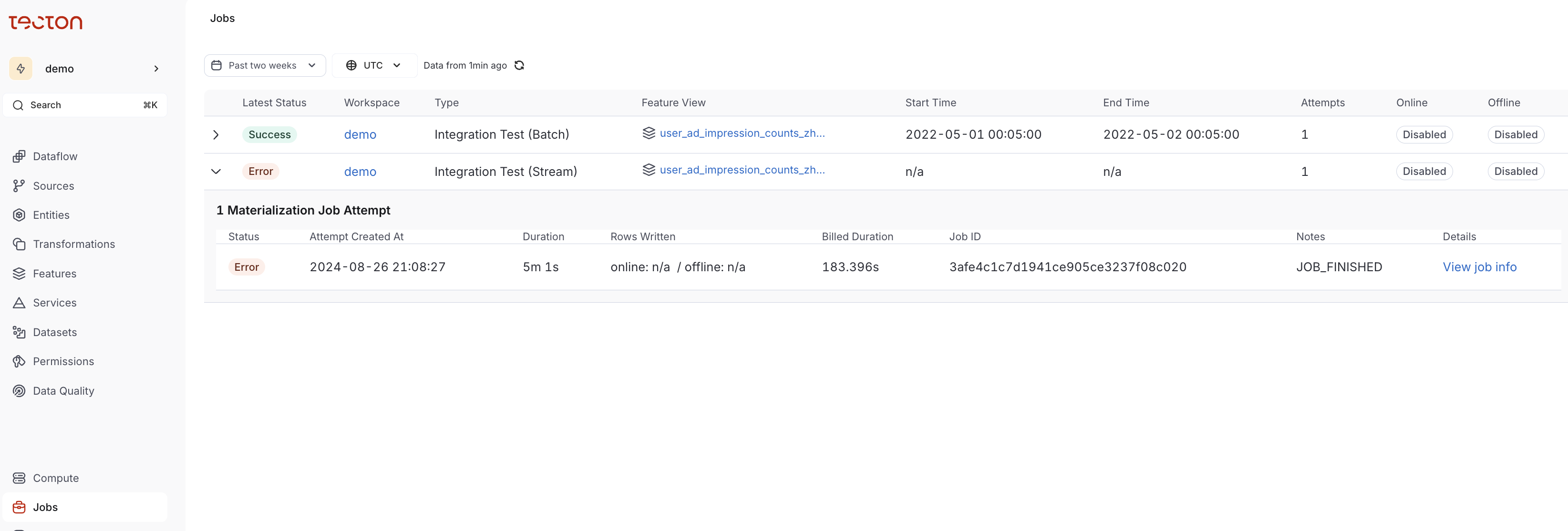
Detailed information about Integration Test jobs are available on the Jobs page
in the UI. We recommend filtering for types
Integration Test(Batch) or Integration Test(Stream).
When ready, you can apply the plan via tecton apply --plan-id {plan_id}